Call tracking is the one conversion type where a silent failure looks identical to everything working. A broken form shows up as a gap in the data fairly quickly. A phone number that is not swapping just quietly attributes nothing — every call the campaign produced goes uncounted, and the account looks like it is underperforming when it is actually working fine.
The awkward part is that you cannot check it by looking. The swap only fires for
someone who arrived by clicking a Google ad: that click sets a cookie called
gwcc, and the tag uses it to decide whether to replace the number. Load your
own site directly and the number stays put — which is correct behaviour, and
tells you nothing.
Two fragments that skip all of that
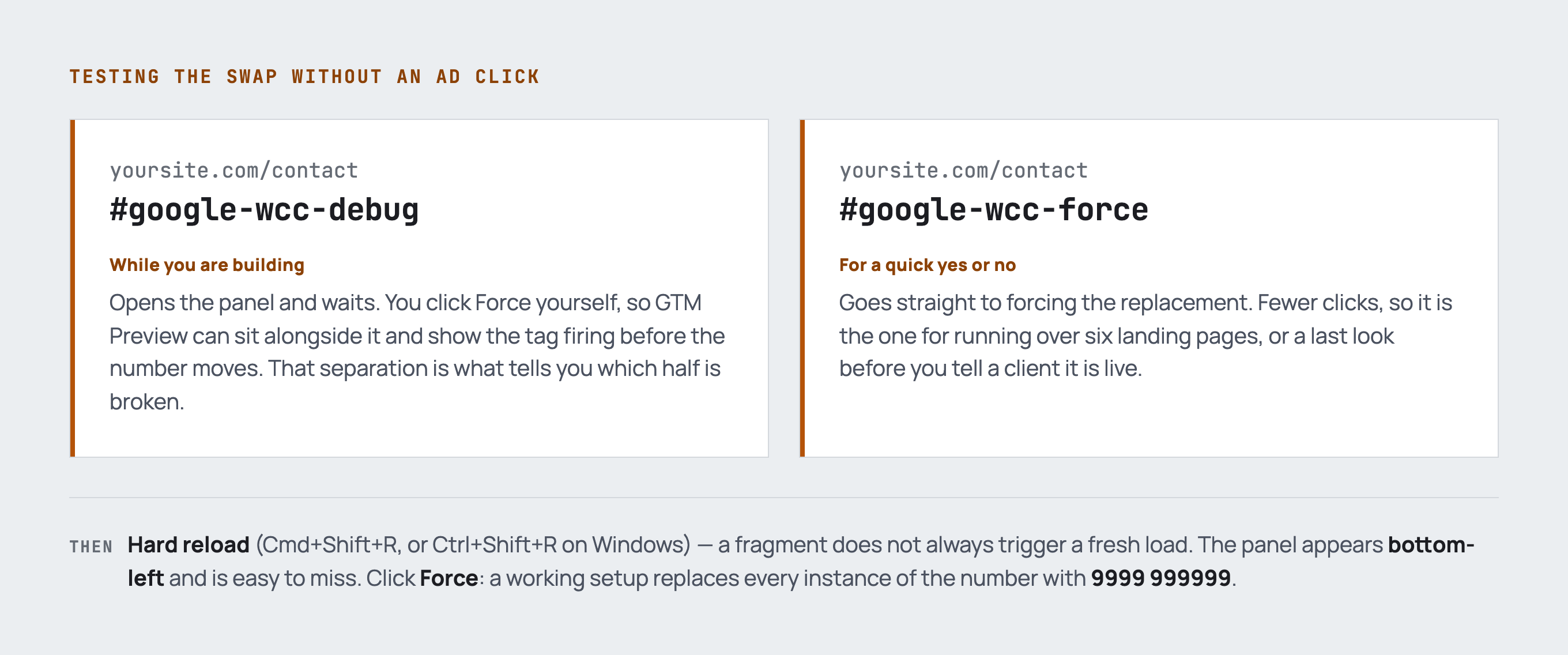
Append either of these to the page and hard reload:
https://example.com/contact#google-wcc-debug
https://example.com/contact#google-wcc-force
A small panel appears in the bottom-left corner. Click Force and a working
setup replaces every instance of the number with obvious test digits, usually
9999 999999.
Use #google-wcc-debug while you are building. You trigger the swap
yourself, so you can have GTM Preview open beside it and watch the tag fire
before anything changes on the page. That separation is what tells you which
half is broken.
Use #google-wcc-force for a quick yes or no on a setup you already believe
works — checking six landing pages in a row, or a last look before you tell a
client it is live.
Two things that make people think the fragments are broken when they are not: hard reload (Cmd+Shift+R, or Ctrl+Shift+R on Windows), because a fragment does not always trigger a fresh load, and the panel is genuinely easy to miss.
What a pass actually proves, and what it does not
A pass means the tag fires on that page and the number it is looking for matches what is rendered. That is all. It does not prove a forwarding number has been provisioned, that calls route to the right phone, or that the conversion will record anything.
Google only assigns forwarding numbers in certain countries, and the conversion only counts when a call runs longer than the call length threshold on the conversion action. Google counts that on its own side, so there is no client-side event to watch.
So: the debug test proves the website plumbing. A live test call proves Google’s side. Do both before you sign anything off.
When it does not swap
In rough order of how often it is the answer:
- A string mismatch. The Phone Conversion Number in the tag has to match the
visible text character for character.
01632 960118will not match01632960118, and neither matches+44 1632 960118. Copy it off the rendered page, not out of a brief or a CRM record - The number is formatted differently in different places. Header one way, footer another, contact page another again — only one will swap. Standardise the site before you build the tag. This is the most common cause by a distance
- It is an image or an SVG. The tag rewrites text in the DOM. A number baked into a hero graphic or a logo will never swap, and needs a real text version somewhere for tracking to mean anything
- It is injected after the tag runs. Sliders, accordions, lazy-loaded blocks and consent-gated content can all arrive too late. Check the number is in the initial HTML
- No panel at all means the tag is not firing on that page — a different problem from the number not matching. Check the trigger is All Pages if the number sits in a global header or footer
- It worked once and now does not. Clear the
gwcccookie; a stale one from a previous test changes the behaviour
The bit that catches everyone
The test call rings the wrong phone. That is not a swap problem. The conversion action holds two separate numbers: the display number, which is on the site and gets replaced, and the destination number, which is where Google routes the call. They are allowed to differ, and that is genuinely useful — you can send paid calls to a specific line, extension or receptionist without touching the website. Check the destination number in the conversion action, not Tag Manager.
One more trap worth knowing: Google Ads hands you a raw gtag snippet for this conversion type and offers no Tag Manager option in the interface, unlike every other conversion action. The GTM template exists — Google Ads Calls from Website Conversion, plus a Conversion Linker on all pages — Google just never mentions it from the Ads side. Plenty of people paste the snippet in because of that and end up with two competing implementations to untangle.
Worth doing if
You run Google Ads and take enquiries by phone. Ten minutes with a debug fragment at setup is worth a month of wondering why the conversions are flat.
If you would rather it was set up and verified properly, get in touch.