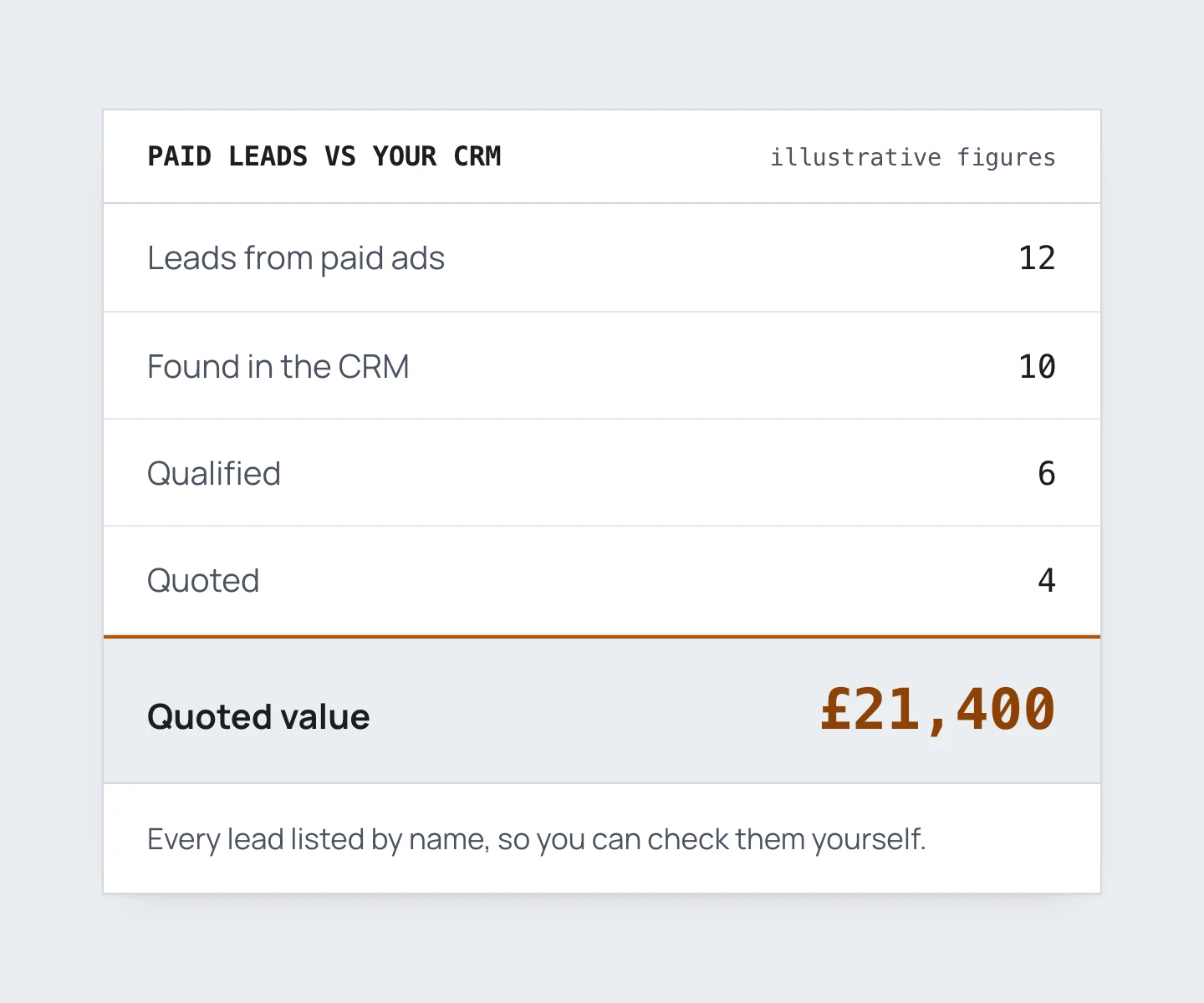
Usually, I ask every client for access to their CRM (if they have one or if they use one), and that’s going to be fine. Some owners do push back, and it’s a fair question: “That’s our customer data, and you’re only running the ads. Why do you need it?”
What CRM access lets me do
The short answer is that it lets me tap into a lot more of the data Google Ads needs. That includes Customer Match lists, which can then be added to automatically so they keep growing, and it means certain leads can be taken out of other audience lists. In many cases it also handles, or at least helps with, offline conversion tracking, which is how Google learns which leads were actually any good.
The biggest reason is visibility. I can see where the leads from paid ads are sitting in your CRM, whether they’re qualified, and whether they’re decent. That tells me I’m on the right path week by week. Without it, we might sit down at a monthly meeting and realise we’ve spent four weeks heading in the wrong direction.
It helps the business too. Every week, fortnight or month, whatever the cadence is, I can send a report with the metrics that actually make a difference. That’s how many people booked, paid or were qualified, what the qualified deal is worth, and the business or contact name for each one.
That answers the question everyone has, which is whether the ads are working. You’re paying for ads and paying someone to run them, and now someone is telling you that these particular businesses came from the ads and ended up in your CRM. On a B2B account, I might send a report with eight names on it. The owner recognises a few of them straight away as decent prospects the team is already talking to. The report shows which came from Google Ads and which from Microsoft Ads, and that puts them at ease without having to dig into the detail every week.
What turns up when paid leads are checked against the CRM
Usually it’s a nudge that we’re going in the right direction. I run a tight ship, and on my B2B accounts I’m not surprised to see 70% to 90% of the leads we produce end up in the CRM, depending on the service. Form leads score higher than phone calls.
Most businesses don’t add new leads to their CRM automatically. A person looks at each one first, pre-qualifies it, and if it’s qualified or somewhat qualified it goes in. That’s normal, and it’s exactly the step I need to be able to see.
Calls score lower partly because some companies don’t want to use call tracking like WhatConverts. Then all we have is a phone number, with no idea who called and no transcript.
A lot of B2B businesses don’t handle calls very well either, and they only realise once we start tracking them. Sometimes I’m flagging problems the business hasn’t noticed in 15, 20 or 30 years. I might see 8 phone calls from the ads that each lasted about 6 minutes, and none of them link to a lead in the CRM. Someone spent 6 to 8 minutes on the phone, yet nobody thought they were worth adding. Either they were qualified and the details got written on a bit of paper and never followed up, or they were people ringing for free information. We need to know which, and with call transcripts we can.
The other thing I find, especially in B2B, is that the team doesn’t use the CRM the same way. The owner often has a nagging feeling about it already. When I come in from outside and start asking how it all works, because I need to know to set things up on my end, it turns into a lightbulb moment. One salesperson marks every lead as qualified. Another never marks anything as qualified, and puts leads either straight into the dead file or straight to a sale. Just asking the questions usually nudges the company into using the CRM more consistently.
How the data is kept safe
The first thing I do is ask for their help, and ask how comfortable they are with me having access. There are ways around it, which I’ll come to, but they’re compromises and never as good as the real thing. If they’re not comfortable, that’s fine and we leave it there. I explain the pros and cons, and what they can do on their side to help the ads instead.
If they’re happy to go ahead, we look at their privacy policy and GDPR position. They check with whoever looks after that in-house, or make sure everything they have is up to date.
I normally ask for read-only access where possible, plus an API key so I can automate pulling the data. That’s mainly for updating Customer Match lists, where the data is hashed before it goes anywhere near Google. Only I see the data, and I make a point of never keeping a client’s customer data on my machine. If I have to download something temporarily, I delete it once the API pull is done. If any of it is kept in an AI system I use, it’s kept for a period we’ve agreed, and 90 days at most. After 90 days the click IDs Google uses for offline conversion tracking aren’t worth anything anyway.
If I set up an API key, I always tell the client I’ve done it. I show them where to find it and how to remove it if we ever part ways. More often than not, the client ends up asking me about API keys and automating things themselves, so I set one up for them and coach them through it.
The workarounds if you’d rather not share
Whatever happens with the CRM, every form lead ends up on a shared spreadsheet. If we’re using WhatConverts or other call tracking, the calls go there too.
Someone at the business then checks the CRM against that master sheet and marks each lead with:
- quotable or not quotable
- sold
- the quote value
- the sale value
This has to happen daily. It’s time-sensitive, and waiting four to seven days between grading leads is too slow.
With WhatConverts, the same thing can happen inside WhatConverts instead of a sheet. The business gets its own login, with as many users as the team needs. They can mark leads as quotable, not quotable or spam, give reasons, leave notes, and add a quote or sale value.
If nobody has time, I can do the grading, or set up automation. In WhatConverts, for example, a rule can mark any call over a certain length as quotable. Whether that fits depends on the business. It’s still a poor workaround next to a true match with what the business itself is seeing.
For B2B companies especially, the customer data is what gets that last 10% of performance. B2B companies have it, and so do B2C businesses that run job management software, so it should be put to work. Apart from personal preference, I’ve never once come across a genuine reason not to share it.
If you’ve asked an agency for this kind of reporting and got nowhere, read how to tell whether they’re doing the job. And if you want leads tracked all the way to a sale, that’s what my lead tracking work sets up.